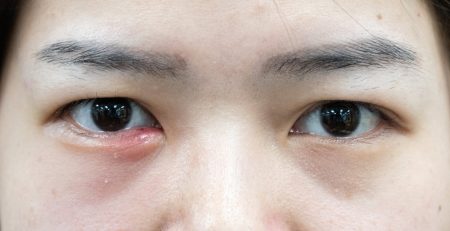

Digital Eye Strain (Computer Vision Syndrome): Symptoms, Causes & Treatment
Published on: 03 September 2026
Prolonged screen time often triggers Digital Eye Strain (Computer Vision Syndrome or asthenopia), a condition marked by eye fatigue, dryness, and discomfort. Because viewing digital displays demands more intense visual processing than reading print, screen glare and diminished blink rates regularly cause ocular strain throughout the workday.
Key Takeaways
- Digital screen strain refers to physical eye discomfort, dryness, and muscle fatigue caused by prolonged exposure to digital screens.
- Typical symptoms include blurred vision, dry or red eyes, headaches associated with eye strain, and persistent neck soreness.
- Quick relief can be achieved by following the 20-20-20 rule to look 20 feet away for 20 seconds every 20 minutes, positioning your monitor at eye level, and consciously increasing your blink rate.
- Underlying triggers for persistent discomfort that lingers despite rest may include uncorrected refractive errors, severe dry eye disease, or presbyopia.
- When regular screen breaks and workstation adjustments fail to alleviate your symptoms, a comprehensive evaluation with an eye specialist is recommended to rule out deeper ocular conditions.
What is Digital Eye Strain?
Digital Eye Strain refers to physical discomfort in the eyes and surrounding muscles triggered by extended periods of screen time, affecting your visual clarity and overall comfort.
The Reality of Screen Time in Singapore
As one of the world’s most digitally connected workforces, professionals in Singapore face a steep cost to their visual health. Between constant screen use at work and on commutes, a large portion of office workers experience daily Digital Eye Strain. This continuous focusing stress is worsened by dry, harshly lit office environments. Furthermore, staring at screens drastically reduces our natural blink rate, causing protective moisture to evaporate rapidly and leaving eyes feeling gritty. Without proper management, this heavy reliance on digital devices can easily turn minor visual discomfort into a persistent daily struggle.
What Causes Screen-Related Eye Fatigue?
Eye fatigue from digital devices is caused by poor lighting, screen glare, improper viewing distances, and underlying vision problems that force the eyes to work harder.
Impact of Prolonged Screen Hours
Spending seven hours or more looking at a digital screen places high demand on your visual system. The eyes are not naturally designed to focus on a fixed near distance for uninterrupted periods. Prolonged focus forces the ciliary muscles (the muscles controlling the eye lens) to stay in continuous contraction, leading to ciliary muscle fatigue and localised aches.
Screen Displays: LCD vs OLED
The type of display screen used can influence visual comfort:
- LCD Monitors: Older LCD screens may utilise backlights that flicker, forcing the eyes to make continuous micro-adjustments.
- OLED Screens: OLED displays light up individual pixels, providing sharper contrast and deeper blacks that reduce reading strain.
Regardless of display technology, glare remains a primary trigger for screen strain. Anti-glare screen covers or monitor brightness adjustments can help reduce unwanted reflections.
Common Digital Eye Strain Symptoms

Recognising symptoms early allows for timely habit adjustments before discomfort worsens. Common indicators include:
- Eyelid Fatigue: A heavy or tired sensation in the eyelids toward the end of the day.
- Ocular Surface Discomfort: A dry, scratchy, or burning sensation on the eye surface.
- Visual Distortions: Temporary blurry or double vision that improves after blinking or looking away.
- Light Sensitivity: Discomfort when exposed to bright indoor lighting or monitors.
- Eye Strain Headaches: A dull ache behind the eyes or around the temples.
- Postural Pain: Soreness in the neck and shoulders from leaning forward toward a display.
Distinguishing Screen Fatigue from Binocular Vision Dysfunction (BVD)
While screen fatigue is common, its symptoms often overlap with deeper ocular conditions. If taking a break from screens resolves your discomfort, you are likely dealing with standard screen fatigue. However, if symptoms persist even on weekends or when you are not working, another issue might be present. Binocular Vision Dysfunction (BVD) is a condition where the eyes struggle to align correctly. BVD forces the eye muscles to constantly strain to create a single, clear image.
| Symptom Feature | Standard Digital Eye Strain | Deeper Issue (e.g., BVD or Presbyopia) |
| Duration | Improves quickly after screen breaks | Persists on weekends or during non-screen tasks |
| Core Trigger | Prolonged digital device usage | Reading any text, even printed books |
| Pain Location | Mild ache around the eyes | Persistent dizziness, nausea, or headache |
Duration and Long-Term Effects
In most cases, eye strain is temporary and improves within a few hours of resting the eyes. Stepping away from workstations, looking into the distance, and allowing the tear film to replenish helps relieve acute symptoms.
However, ignoring persistent strain over extended periods may aggravate existing surface conditions, such as evaporative dry eye disease. Continuous dryness can lead to micro-abrasions on the cornea and localised inflammation, requiring structured clinical management rather than simple rest.
Practical Relief Strategies
Targeted habits can relieve acute symptoms and support daily visual comfort. To reduce strain, implement the 20-20-20 rule, optimise your workstation ergonomics, use artificial tears, and adjust your monitor settings to reduce glare.
The 20-20-20 Rule
Every 20 minutes, take a 20-second break to focus on an object at least 20 feet (6 meters) away. This shifts the focus distance, allowing the internal ciliary muscles to relax fully.
Workstation Ergonomics and Blinking
- Positioning: Set your screen about an arm’s length away, with the top of the monitor resting slightly below eye level.
- Gaze Angle: Looking slightly downward reduces the exposed surface area of the eye, slowing tear film instability.
- Blink Awareness: Make a deliberate effort to blink completely and regularly to distribute natural moisture evenly across the eye.
Do Blue Light Glasses Work?
Blue light blocking lenses do filter out the specific wavelengths of light emitted by screens. However, clinical literature indicates that blue light itself is not the primary cause of eye fatigue. The strain comes from how we use the screens, including decreased blinking, poor posture, and glare. While some patients feel more comfortable wearing anti-fatigue or lightly tinted lenses, these glasses are not a substitute for proper screen habits and ergonomic adjustments.
Underlying Eye Conditions
Sometimes visual discomfort attributed to screen use is actually an underlying age-related focusing issue like presbyopia or a chronic tear film disorder.
Age-Related Presbyopia
Presbyopia is the gradual loss of near-focusing ability that naturally occurs with age, typically becoming noticeable around age 40. As the internal eye lens becomes less flexible, focusing on near objects requires extra effort. Early presbyopia is often mistaken for screen fatigue. Corrective prescription lenses or progressive glasses can help relieve this extra focusing load.
Evaporative Dry Eye Disease
Infrequent blinking during screen use causes the oils produced by the meibomian glands to harden, leading to Meibomian Gland Dysfunction (MGD). Without an adequate oil layer, the liquid layer of your tears evaporates quickly. Over-the-counter lubricating drops provide temporary moisture, but managing persistent dry eye often requires addressing gland function directly.
When to Consult an Eye Specialist
A comprehensive eye examination is recommended if screen fatigue persists despite ergonomic adjustments, or if it is accompanied by severe pain, chronic redness, or persistent vision changes. An eye specialist can evaluate visual acuity, check intraocular pressure, assess tear film stability, and rule out underlying conditions such as uncorrected refractive errors, presbyopia, or dry eye disease. Professional management options may include prescription anti-inflammatory drops, eyelid hygiene regimens, or targeted in-clinic procedures to restore proper meibomian gland function.
Schedule an Eye Assessment in Singapore
If persistent eye fatigue or dryness is affecting your daily comfort and work productivity, professional guidance can help identify the root cause. Schedule an appointment to evaluate your tear film stability, check for uncorrected refractive errors, and discuss personalised relief options.
Take the Next Step
Early detection and treatment are crucial to safeguarding your vision from the irreversible damage.
Book the Comprehensive $88 Cataract & Glaucoma Screening.
Book a Cataract & Glaucoma Screening for $88
Don’t wait for symptoms to appear before taking action. Early detection is key to preserving your vision.
At Dr Roy Tan’s clinic, we offer a comprehensive Cataract & Glaucoma Screening for just $88. This screening is designed to assess your eye health thoroughly, identify any early indicators of glaucoma or cataracts, and discuss your personalised options if either condition is detected.